




Version: 2.152.0
This release improves how audit data can be exported and reviewed. It introduces CSV and PDF export across all Audit Trail views, gives admins full control over which data points are included in exports, and fixes an issue where form history was not showing the correct historical state.
What’s new
Audit Trail export controls
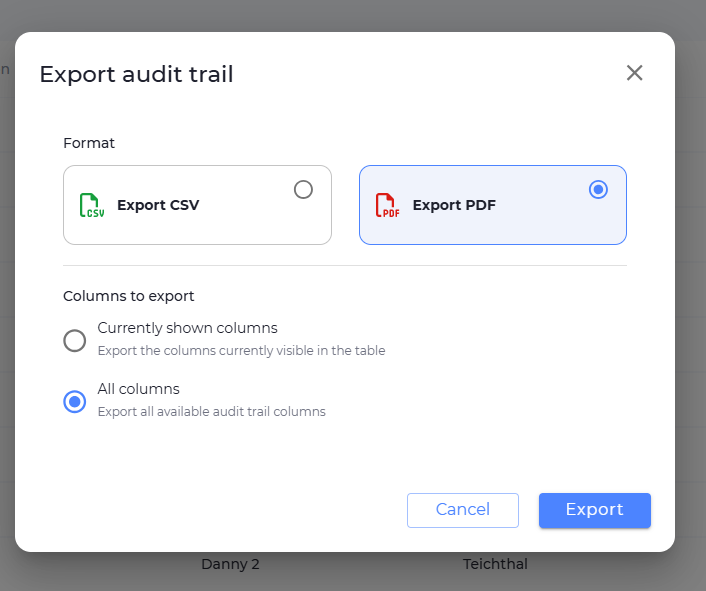
Admins can now export data from all Audit Trail views in both CSV and PDF format. This applies across the following views: Users, Email, Forms, Submissions, Logins, Automations, and Deleted Forms.
Exports are now fully customisable – admins can choose exactly which fields and data points to include, rather than being limited to a fixed export.
This includes:
- Downloading audit data as a CSV
- Downloading audit data as a PDF
- Choosing all fields/columns for export
- Selecting only the specific fields/columns needed
- Exporting only filtered results when filters are applied
Fixes
Audit Trail form history now shows historical state
We’ve fixed an issue where clicking See Form on an entry in the Audit Trail Forms view was showing the current state of the form rather than how it looked at the time of the change. Subfields of complex fields that were not displaying at all are now also shown correctly.
Instructional text colour restored to black
We’ve fixed an issue where instructional text in forms was displaying in grey, making it appear disabled or less important. Instructional text now displays in black by default, and existing text has been updated automatically.